
You open Instagram to see your sister's vacation photos and 25 minutes later you're still swiping through Reels. There's no setting that turns off Instagram Reels. Six settings on your iPhone do cut how many you see, and a limit outside Instagram removes the Reels feed completely.
Updated October 2026, Instagram for iPhone. Menu names change often. If a label looks different on your phone, pick the closest match.
In short
- You can't switch off Reels or hide the Reels tab.
- The strongest built-in fix is the Following feed: only accounts you follow, newest first.
- Daily limit and Not interested slow you down. A real stop lives outside Instagram.
Can you turn off Reels on Instagram?
No. Instagram has no Reels toggle and no way to remove the Reels tab from the bar at the bottom. That's by design: in 2024 Mark Zuckerberg said Reels already made up about half of the time people spend in the app (Meta Q1 2024 earnings call). In the US antitrust case, a federal judge noted that Americans now spend only about 7% of their Instagram time on content from friends (FTC v. Meta, Nov 18, 2025, PDF).
What you can do: keep Reels out of your way, slow the algorithm down and set yourself a limit. The six steps stack.
How to hide Reels: 6 settings on iPhone
Switch to the Following feed
Tap the Instagram logo in the top-left corner of your home feed and choose Following or Favorites.
You only see posts from accounts you follow, newest first, with no suggestions from strangers. Two catches: the next time you open the app you're back on the regular feed. And Reels from people you follow still show up.
Snooze suggested posts
On a suggested post in your feed, tap the X or the three dots and snooze suggested posts for 30 days.
It works on the home feed, not the Reels tab, and you'll need to repeat it after 30 days. Not every app version shows the option.
Mark Reels as Not interested
On a Reel you don't want, tap the three dots and choose Not interested.
This slows down specific topics, not Reels overall. Useful against the one topic that pulls you in every night, like fail videos or kitchen hacks.
Reset suggested content
Go to your profile, tap the menu in the top-right corner, open Content preferences and tap Reset suggested content.
Instagram forgets what it learned about you across Explore, Reels and Feed (Meta). You'll get different Reels, not fewer. You can't undo it.
Set a daily limit inside Instagram
Go to your profile, tap the menu in the top-right corner, then Time management and Daily limit.
In older versions it sits under Your activity and Time spent. When time's up, Instagram shows a reminder you can snooze or ignore for the day. There's no limit just for Reels.
Block Instagram with iPhone Screen Time
In your iPhone's Settings, open Screen Time, give Instagram a daily time budget and lock it with a Screen Time passcode.
This is the only real lock, but it hits the whole app: once the budget is gone, messages and Stories go too. Our guide on how to set app limits on iPhone shows the iOS 27 menus.
How to use Instagram without Reels
The six steps slow Reels down. Only a limit outside the Instagram app ends them. That's what Feedbye, our iPhone app, is for: you open Instagram in Feedbye, the Reels feed and Explore are hidden, and you start on Following.
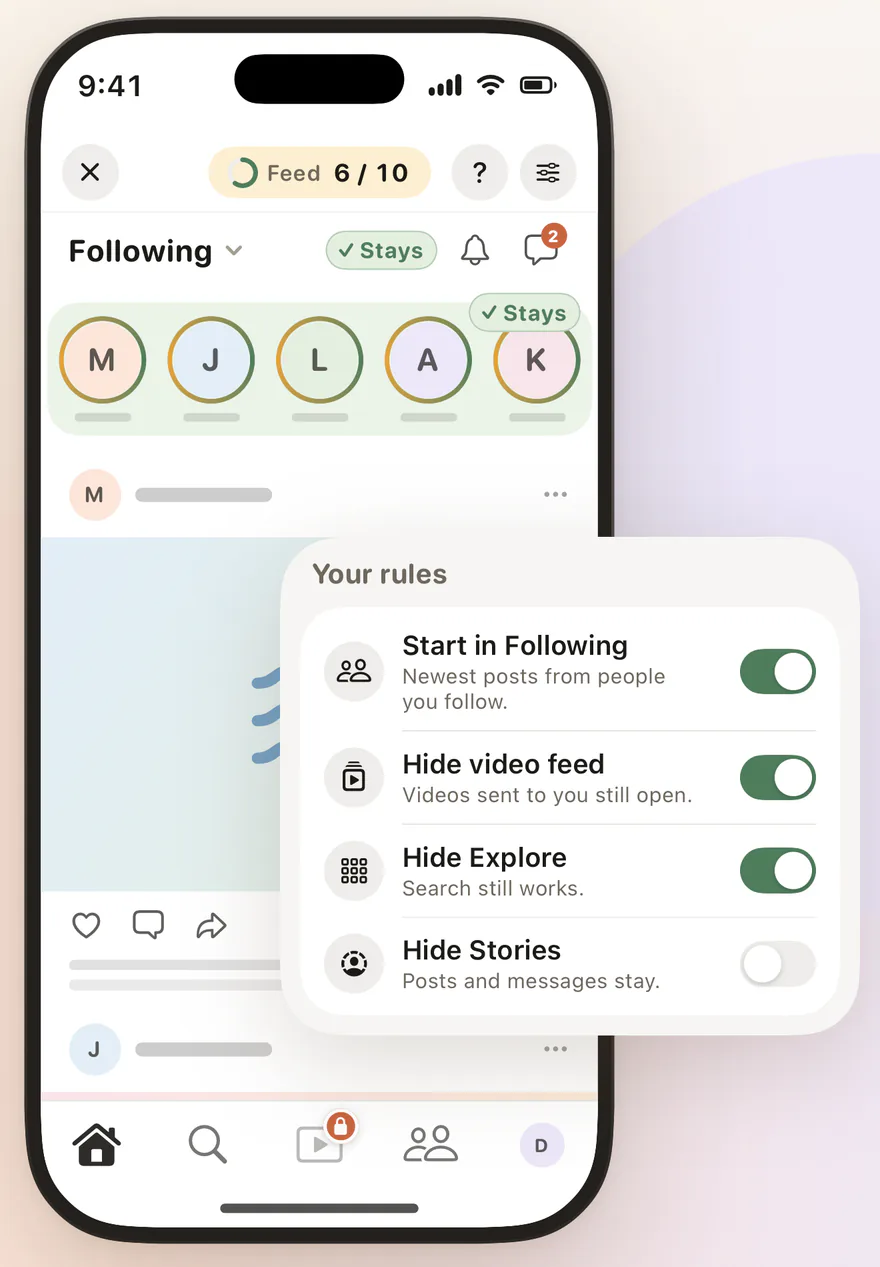
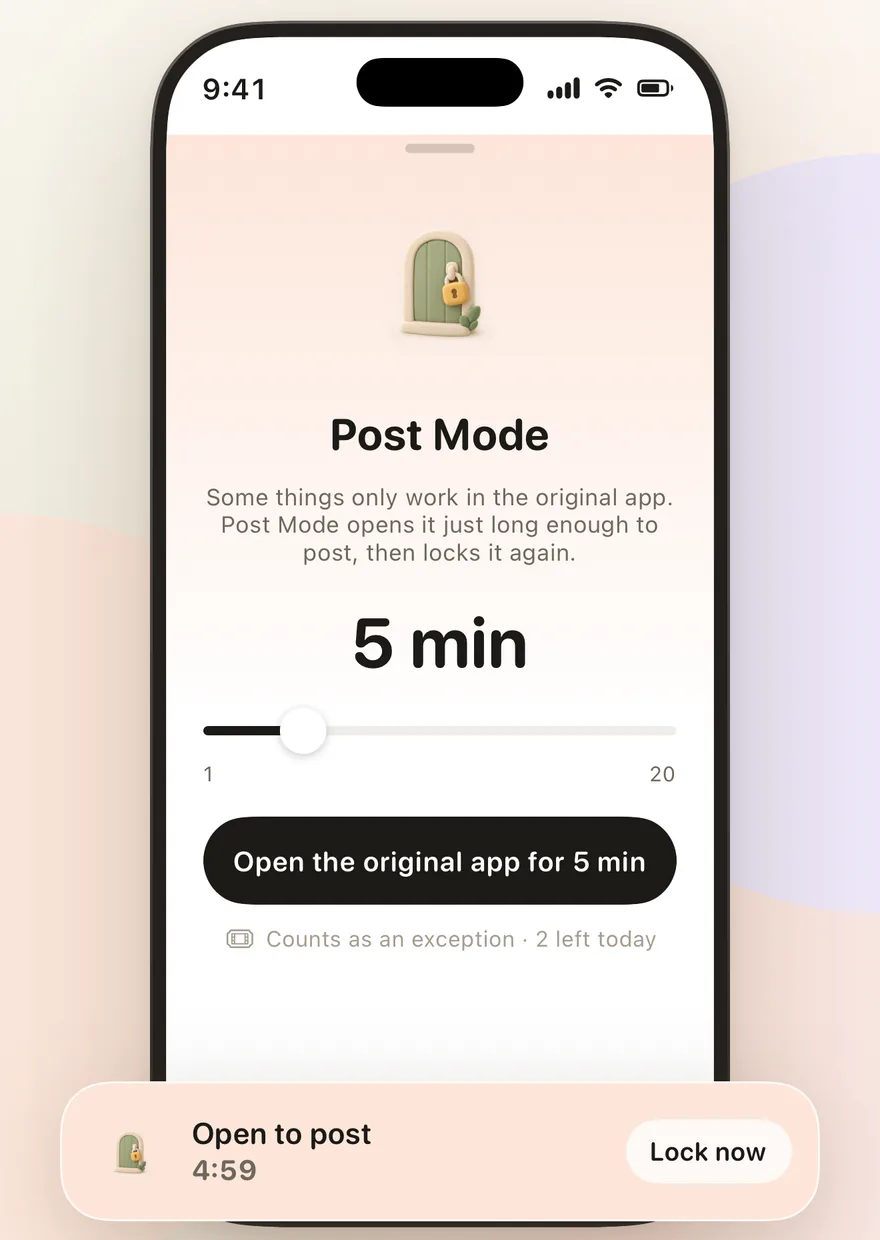
- Daily limit: after 10 feed posts you're done for the day, and you choose the number. Three exceptions a day cover real emergencies.
- Reels from friends: when someone sends you a Reel, it still opens. Only the endless Reels feed stays shut.
- Original app blocked: you block the Instagram app with Apple's Screen Time. To post, Post Mode opens it for a few minutes.

Feedbye is independent and not affiliated with Meta or Instagram.
What doesn't work
- Instagram in a browser: instagram.com has Reels too. It's just clunkier.
- Modded Instagram apps: clones that strip Reels ask for your password. That puts your account at risk.
- Deleting the app: it works, but you lose messages and Stories too. A gentler route is our social media detox checklist.
 Reels feed gone, messages stay: here's how with FeedbyeGet the app
YouTube is easier: you can set its Shorts limit to zero, see how to turn off YouTube Shorts. For TikTok, see how to use TikTok less.
FAQ
Can you turn off Reels on Instagram completely?
No. As of October 2026 there is no official setting that turns off Reels or removes the Reels tab. You can only see fewer of them, with the Following feed, Not interested and a daily limit, or use Instagram through an app like Feedbye that hides the Reels feed.
Why do I still see Reels in my Following feed?
The Following feed shows everything the accounts you follow post, including their Reels. It only removes suggestions from accounts you don't follow.
Is there a time limit just for Reels on Instagram?
No, not as of October 2026. Instagram's daily limit covers the whole app and is a reminder you can ignore. YouTube, by contrast, has a separate limit for its Shorts feed.
How do I use Instagram without Reels?
With an app that hides the Reels feed, such as Feedbye. You start on Following, the Reels feed and Explore are gone, and messages and Stories stay. You block the Instagram app itself with Screen Time.
Is Feedbye an official Instagram app?
No. Feedbye is an independent iPhone app and is not affiliated with Meta or Instagram.