
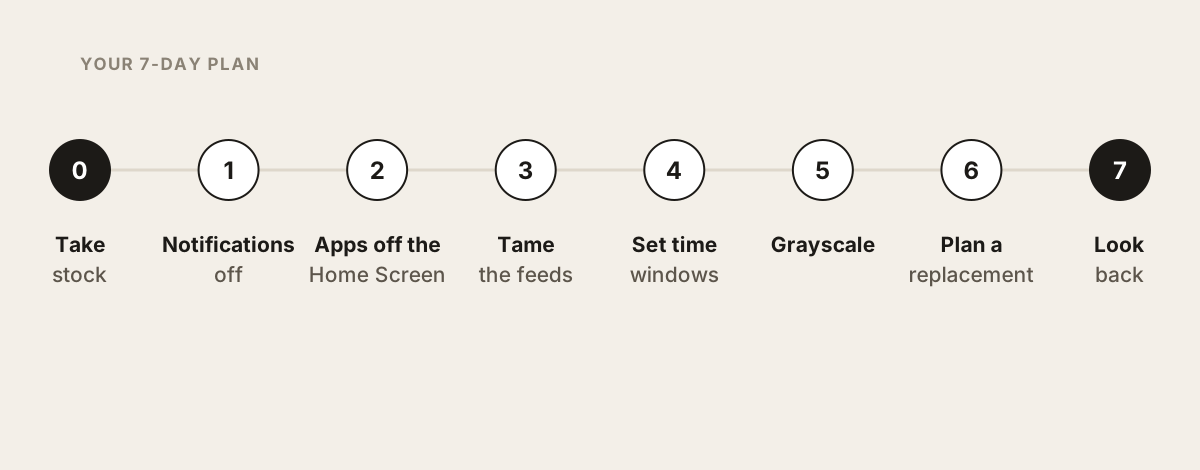
A social media detox usually means deleting everything. After a few days you miss the group chats and every app is back. This checklist works differently: keep the people, take power away from the endless feeds. Seven days, one small step a day on your iPhone.
Updated October 2026. Menu names follow Apple's iOS 27 guides; where iOS 26 differs, it says so.
Key takeaways
- A detox without deleting apps limits the feeds, not your friends.
- The strongest steps live outside the apps: notifications off, apps off your Home Screen, schedules locked with a passcode.
- Deleting just one app often shifts part of that time to other apps.
- After seven days you'll know which boundaries hold for you and which need to be firmer.
Why detox without deleting?
Quitting entirely is honest, but unrealistic for most people. And it has a catch that a large study showed: when people deactivated Facebook for six weeks, part of the freed-up time moved to Instagram, other social apps and news apps, adding up to about a quarter of their old Facebook time (Allcott et al., PNAS 2024). Deleting one app tends to move the problem around.
At the same time, less feed really does free up time. In a Stanford and NYU experiment, people who deactivated Facebook for four weeks gained about an hour a day on average (Allcott et al., AER 2020). And you're far from alone in wanting this: 53% of US adults say they spend too much time on their smartphone, and 45% tried to cut back in the past year (Pew Research Center, 2026).
By "detox" we mean the everyday kind: less feed, more of your own day. It's not a medical program.
Day 0: Take stock
Before changing anything, look honestly:
The 7-day checklist
Day 1: Turn off notifications
Day 2: Get apps off your Home Screen
Day 3: Defuse the feeds
Day 4: Set time windows
Day 5: Use grayscale as a brake
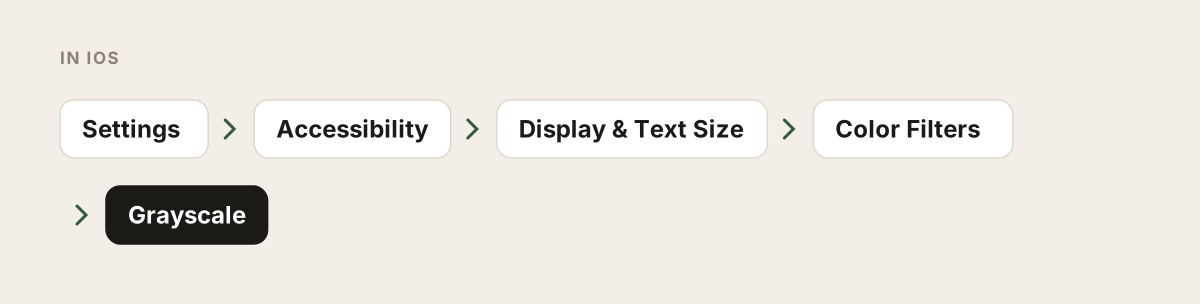
Day 6: Plan replacements
Day 7: Review
Every option, side by side
| Option | What it limits | Friends and messages | How easy to skip? |
|---|---|---|---|
| In-app daily limit | Time in the app (on YouTube: the Shorts feed) | stay | very easy, dismiss the reminder |
| Screen Time: Time Allowances or App Limits | whole apps or categories | blocked too once time is up, unless Always Allowed | hard with someone else's passcode, easy otherwise |
| Screen Time: Schedule or Downtime | apps at set times of day | blocked during those times | same as above |
| Deleting the app | everything | gone | reinstall in seconds |
| Website instead of app | nothing, just less convenient | usually available | very easy |
| Feedbye | endless feeds and the number of feed posts per day | stay | 3 exceptions a day, original apps can be blocked with Screen Time |
Where Feedbye fits
The checklist works without any extra app. But if you notice that the endless feeds are what keep pulling you back, Feedbye can take over days 3 and 4 for good. Our iPhone app lets you use Instagram, YouTube, TikTok, Threads, X and Facebook without Reels, Shorts and For You, while friends, messages and Stories stay. Each app gets a daily limit of feed posts, say 10, and then the feed ends. There are also small habits, a hamster mascot whose energy rises when you stay under your limit, a focus timer and a sleep mode. Feedbye is independent and not affiliated with Meta, Google, ByteDance or X.
Learn more about a gentle social media detox without deleting a single app on the home page. And if late-night scrolling is your main issue, read how to stop doomscrolling.
FAQ
How long should a social media detox last?
There's no fixed rule. One week is enough to see which habits bother you and which settings help. After that it's less about a break and more about a setup that fits your life.
Will I lose touch with friends if I detox without deleting apps?
No, that's the whole point. You limit the endless feeds, not messages, group chats and Stories from people you care about.
What does a social media detox actually do?
Mostly it gives you time back and the feeling that you decide when you scroll. We don't promise health effects; if you're worried about your wellbeing, talk to a doctor.
What if I end up scrolling for hours again?
Don't quit, adjust. Usually one boundary was too easy to skip, such as a limit without a passcode or an app still on your Home Screen. Make that exact spot firmer.